# The Missing Wireguard Documentation

API reference guide for Wireguard including Setup, Configuration, and Usage, with examples.
All credit goes to the WireGuard project, [zx2c4](https://www.zx2c4.com/), [Edge Security](https://www.edgesecurity.com/), and the [open source contributors](https://github.com/WireGuard/WireGuard/graphs/contributors) for the original software,
this is my solo unofficial attempt at providing more comprehensive documentation, API references, and examples.
Source for these docs, example code, and issue tracker: https://github.com/pirate/wireguard-docs
Nicer HTML page version: https://docs.sweeting.me/s/wireguard
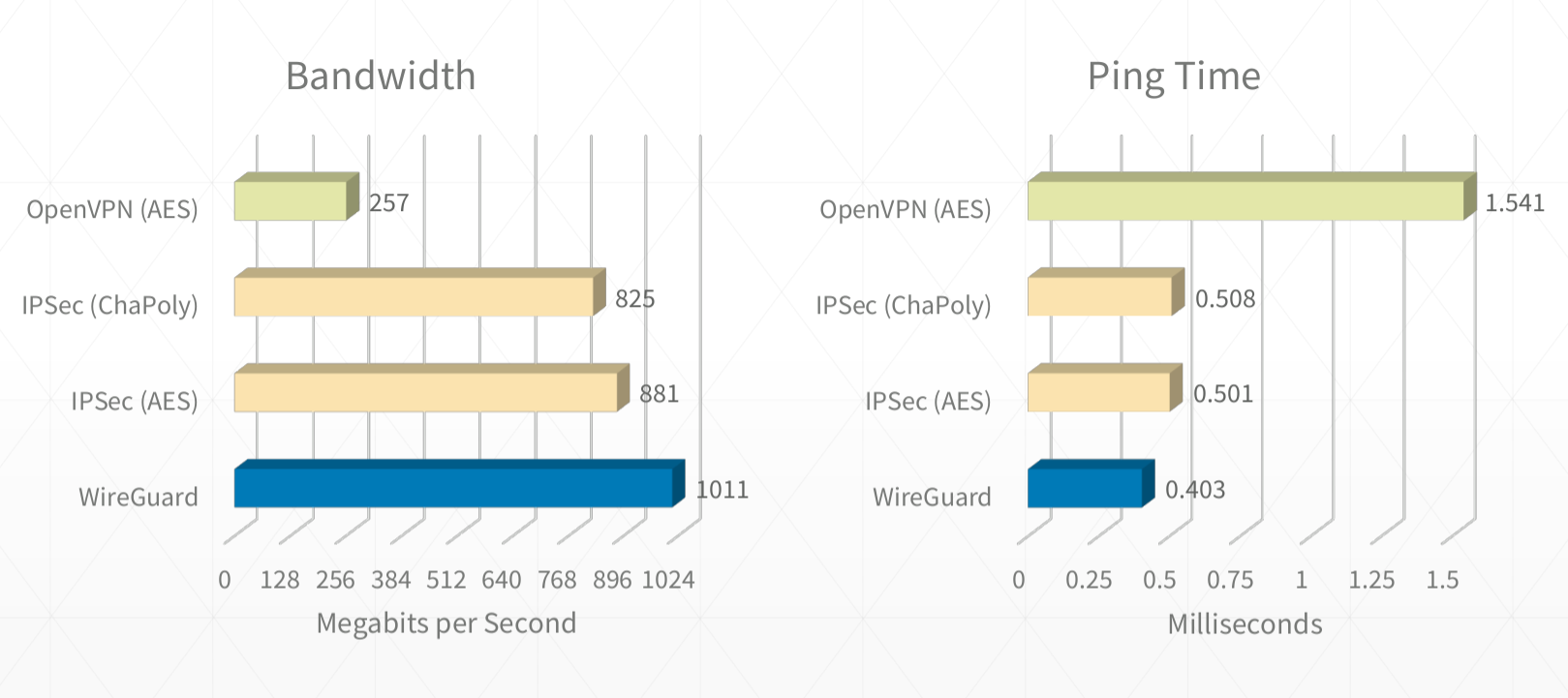

 Further reading:
- https://www.wireguard.com/performance/
- https://www.reddit.com/r/linux/comments/9bnowo/wireguard_benchmark_between_two_servers_with_10/
- https://restoreprivacy.com/openvpn-ipsec-wireguard-l2tp-ikev2-protocols/
### WireGuard Security Model
WireGuard uses the following protocols and primitives to secure traffic:
- ChaCha20 for symmetric encryption, authenticated with Poly1305, using RFC7539’s AEAD construction
- Curve25519 for ECDH
- BLAKE2s for hashing and keyed hashing, described in RFC7693
- SipHash24 for hashtable keys
- HKDF for key derivation, as described in RFC5869
> WireGuard's cryptography is essentially an instantiation of Trevor Perrin's Noise framework. It's modern and, again, simple. Every other VPN option is a mess of negotiation and handshaking and complicated state machines. WireGuard is like the Signal/Axolotl of VPNs, except it's much simpler and easier to reason about (cryptographically, in this case) than double ratchet messaging protocols.
> It is basically the qmail of VPN software.
> And it's ~4000 lines of code. It is plural orders of magnitude smaller than its competitors.
>
https://news.ycombinator.com/item?id=14599834
Further reading:
- https://www.wireguard.com/papers/wireguard.pdf
- https://eprint.iacr.org/2018/080.pdf
- https://courses.csail.mit.edu/6.857/2018/project/He-Xu-Xu-WireGuard.pdf
- https://www.wireguard.com/talks/blackhat2018-slides.pdf
- https://arstechnica.com/gadgets/2018/08/wireguard-vpn-review-fast-connections-amaze-but-windows-support-needs-to-happen/
### How WireGuard Manages Keys
Authentication in both directions is achieved with a simple public/private keypair for each peer. Each peer generates these keys during the setup phase, and shares only the public key with other peers.
No other certificates or preshared keys are needed beyond the public/private keys for each node.
Key generation, distribution, and revocation can be handled in larger deployments using a separate service like Ansible or Kubernetes Secrets.
Some services that help with key distribution and deployment:
- https://pypi.org/project/wireguard-p2p/
- https://github.com/trailofbits/algo
- https://github.com/StreisandEffect/streisand
- https://github.com/its0x08/wg-install
- https://github.com/brittson/wireguard_config_maker
You can also read in keys from a file or via command if you don't want to hardcode them in `wg0.conf`, this makes managing keys via 3rd party service much easier:
```ini
[Interface]
...
PostUp = wg set %i private-key /etc/wireguard/wg0.key <(cat /some/path/%i/privkey)
```
---
## Usage
### Quickstart
Overview of the general process:
1. Install `apt install wireguard` or `pkg/brew install wireguard-tools` on each node
2. Generate public and private keys locally on each node `wg genkey`+`wg pubkey`
3. Create a `wg0.conf` wireguard config file on the main relay server
- `[Interface]` Make sure to specify a CIDR range for the entire VPN subnet when defining the address the server accepts routes for `Address = 10.0.0.1/24`
- `[Peer]` Create a peer section for every client joining the VPN, using their corresponding remote public keys
4. Create a `wg0.conf` on each client node
- `[Interface]` Make sure to specify only a single IP for client peers that don't relay traffic `Address = 10.0.0.3/32`.
- `[Peer]` Create a peer section for each public peer not behind a NAT, make sure to specify a CIDR range for the entire VPN subnet when defining the remote peer acting as the bounce server `AllowedIPs = 10.0.0.1/24`. Make sure to specify individual IPs for remote peers that don't relay traffic and only act as simple clients `AllowedIPs = 10.0.0.3/32`.
5. Start wireguard on the main relay server with `wg-quick up /full/path/to/wg0.conf`
6. Start wireguard on all the client peers with `wg-quick up /full/path/to/wg0.conf`
7. Traffic is routed from peer to peer using most specific route first over the WireGuard interface, e.g. `ping 10.0.0.3` checks for a direct route to a peer with `AllowedIPs = 10.0.0.3/32` first, then falls back to a relay server that's accepting ips in the whole subnet
### Setup
```bash
# install on Ubuntu
sudo add-apt-repository ppa:wireguard/wireguard
apt install wireguard
# install on macOS
brew install wireguard-tools
# install on FreeBSD
pkg install wireguard
# install on iOS/Android using Apple App Store/Google Play Store
# install on other systems using https://www.wireguard.com/install/#installation
```
```bash
# to enable kernel relaying/forwarding ability on bounce servers
echo "net.ipv4.ip_forward = 1" >> /etc/sysctl.conf
echo "net.ipv4.conf.all.proxy_arp = 1" >> /etc/sysctl.conf
sudo sysctl -p /etc/sysctl.conf
# to add iptables forwarding rules on bounce servers
iptables -A INPUT -m conntrack --ctstate RELATED,ESTABLISHED -j ACCEPT
iptables -A FORWARD -m conntrack --ctstate RELATED,ESTABLISHED -j ACCEPT
iptables -A FORWARD -i wg0 -o wg0 -m conntrack --ctstate NEW -j ACCEPT
iptables -t nat -A POSTROUTING -s 10.0.0.0/24 -o eth0 -j MASQUERADE
```
### Config Creation
```bash
nano wg0.conf # can be placed anywhere, must be referred to using absolute path
```
### Key Generation
```bash
# generate private key
wg genkey > example.key
# generate public key
wg pubkey < example.key > example.key.pub
```
### Start / Stop
```bash
wg-quick up /full/path/to/wg0.conf
wg-quick down /full/path/to/wg0.conf
# Note: you must specify the absolute path to wg0.conf, relative paths won't work
```
```bash
# start/stop VPN network interface
ip link set wg0 up
ip link set wg0 down
# register/unregister VPN network interface
ip link add dev wg0 type wireguard
ip link delete dev wg0
# register/unregister local VPN address
ip address add dev wg0 10.0.0.3/32
ip address delete dev wg0 10.0.0.3/32
# register/unregister VPN route
ip route add 10.0.0.3/32 dev wg0
ip route delete 10.0.0.3/32 dev wg0
```
### Inspect
#### Interfaces
```bash
# show system LAN and WAN network interfaces
ifconfig
ip address show
# show system VPN network interfaces
ifconfig wg0
ip link show wg0
# show wireguard VPN interfaces
wg show all
wg show wg0
```
#### Addresses
```bash
# show public ip address
ifconfig eth0
ip address show eth0
dig -4 +short myip.opendns.com @resolver1.opendns.com
# show VPN ip address
ip address show wg0
```
#### Routes
```bash
# show wireguard routing table and peer connections
wg show
wg show wg0 allowed-ips
# show system routing table
ip route show table main
ip route show table local
# show system route to specific address
ip route get 10.0.0.3
```
### Testing
#### Ping Speed
```bash
# check that main relay server is accessible directly via public internet
ping public-server1.example-vpn.dev
# check that the main relay server is available via VPN
ping 10.0.0.1
# check that public peers are available via VPN
ping 10.0.0.2
# check that remote NAT-ed peers are available via VPN
ping 10.0.0.3
# check that NAT-ed peers in your local lan are available via VPN
ping 10.0.0.4
```
#### Bandwidth
```bash
# install iperf using your preferred package manager
apt/brew/pkg install iperf
# check bandwidth over public internet to relay server
iperf -s # on public relay server
iperf -c public-server1.example-vpn.dev # on local client
# check bandwidth over VPN to relay server
iperf -s # on public relay server
iperf -c 10.0.0.1 # on local client
# check bandwidth over VPN to remote public peer
iperf -s # on remote public peer
iperf -c 10.0.0.2 # on local client
# check bandwidth over VPN to remote NAT-ed peer
iperf -s # on remote NAT-ed peer
iperf -c 10.0.0.3 # on local client
# check bandwidth over VPN to local NAT-ed peer (on same LAN)
iperf -s # on local NAT-ed peer
iperf -c 10.0.0.4 # on local client
```
#### DNS
Check for DNS leaks using http://dnsleak.com, or by checking the resolver on a lookup:
```bash
dig example.com A
```
---
## Config Reference
### Overview
WireGuard config is in INI syntax, defined in a file usually called `wg0.conf`. It can be placed anywhere on the system, but is often placed in `/etc/wireguard/wg0.conf`.
The config path is specified as an argument when running any `wg-quick` command, e.g:
`wg-quick up /etc/wireguard/wg0.conf` (always specify the full, absolute path)
Config files can opt to use the limited set of `wg` config options, or the more extended `wg-quick` options, depending on what command is preferred to start WireGuard. These docs recommend sticking to `wg-quick` as it provides a more powerful and user-friendly config experience.
**Jump to definition:**

Further reading:
- https://www.wireguard.com/performance/
- https://www.reddit.com/r/linux/comments/9bnowo/wireguard_benchmark_between_two_servers_with_10/
- https://restoreprivacy.com/openvpn-ipsec-wireguard-l2tp-ikev2-protocols/
### WireGuard Security Model
WireGuard uses the following protocols and primitives to secure traffic:
- ChaCha20 for symmetric encryption, authenticated with Poly1305, using RFC7539’s AEAD construction
- Curve25519 for ECDH
- BLAKE2s for hashing and keyed hashing, described in RFC7693
- SipHash24 for hashtable keys
- HKDF for key derivation, as described in RFC5869
> WireGuard's cryptography is essentially an instantiation of Trevor Perrin's Noise framework. It's modern and, again, simple. Every other VPN option is a mess of negotiation and handshaking and complicated state machines. WireGuard is like the Signal/Axolotl of VPNs, except it's much simpler and easier to reason about (cryptographically, in this case) than double ratchet messaging protocols.
> It is basically the qmail of VPN software.
> And it's ~4000 lines of code. It is plural orders of magnitude smaller than its competitors.
>
https://news.ycombinator.com/item?id=14599834
Further reading:
- https://www.wireguard.com/papers/wireguard.pdf
- https://eprint.iacr.org/2018/080.pdf
- https://courses.csail.mit.edu/6.857/2018/project/He-Xu-Xu-WireGuard.pdf
- https://www.wireguard.com/talks/blackhat2018-slides.pdf
- https://arstechnica.com/gadgets/2018/08/wireguard-vpn-review-fast-connections-amaze-but-windows-support-needs-to-happen/
### How WireGuard Manages Keys
Authentication in both directions is achieved with a simple public/private keypair for each peer. Each peer generates these keys during the setup phase, and shares only the public key with other peers.
No other certificates or preshared keys are needed beyond the public/private keys for each node.
Key generation, distribution, and revocation can be handled in larger deployments using a separate service like Ansible or Kubernetes Secrets.
Some services that help with key distribution and deployment:
- https://pypi.org/project/wireguard-p2p/
- https://github.com/trailofbits/algo
- https://github.com/StreisandEffect/streisand
- https://github.com/its0x08/wg-install
- https://github.com/brittson/wireguard_config_maker
You can also read in keys from a file or via command if you don't want to hardcode them in `wg0.conf`, this makes managing keys via 3rd party service much easier:
```ini
[Interface]
...
PostUp = wg set %i private-key /etc/wireguard/wg0.key <(cat /some/path/%i/privkey)
```
---
## Usage
### Quickstart
Overview of the general process:
1. Install `apt install wireguard` or `pkg/brew install wireguard-tools` on each node
2. Generate public and private keys locally on each node `wg genkey`+`wg pubkey`
3. Create a `wg0.conf` wireguard config file on the main relay server
- `[Interface]` Make sure to specify a CIDR range for the entire VPN subnet when defining the address the server accepts routes for `Address = 10.0.0.1/24`
- `[Peer]` Create a peer section for every client joining the VPN, using their corresponding remote public keys
4. Create a `wg0.conf` on each client node
- `[Interface]` Make sure to specify only a single IP for client peers that don't relay traffic `Address = 10.0.0.3/32`.
- `[Peer]` Create a peer section for each public peer not behind a NAT, make sure to specify a CIDR range for the entire VPN subnet when defining the remote peer acting as the bounce server `AllowedIPs = 10.0.0.1/24`. Make sure to specify individual IPs for remote peers that don't relay traffic and only act as simple clients `AllowedIPs = 10.0.0.3/32`.
5. Start wireguard on the main relay server with `wg-quick up /full/path/to/wg0.conf`
6. Start wireguard on all the client peers with `wg-quick up /full/path/to/wg0.conf`
7. Traffic is routed from peer to peer using most specific route first over the WireGuard interface, e.g. `ping 10.0.0.3` checks for a direct route to a peer with `AllowedIPs = 10.0.0.3/32` first, then falls back to a relay server that's accepting ips in the whole subnet
### Setup
```bash
# install on Ubuntu
sudo add-apt-repository ppa:wireguard/wireguard
apt install wireguard
# install on macOS
brew install wireguard-tools
# install on FreeBSD
pkg install wireguard
# install on iOS/Android using Apple App Store/Google Play Store
# install on other systems using https://www.wireguard.com/install/#installation
```
```bash
# to enable kernel relaying/forwarding ability on bounce servers
echo "net.ipv4.ip_forward = 1" >> /etc/sysctl.conf
echo "net.ipv4.conf.all.proxy_arp = 1" >> /etc/sysctl.conf
sudo sysctl -p /etc/sysctl.conf
# to add iptables forwarding rules on bounce servers
iptables -A INPUT -m conntrack --ctstate RELATED,ESTABLISHED -j ACCEPT
iptables -A FORWARD -m conntrack --ctstate RELATED,ESTABLISHED -j ACCEPT
iptables -A FORWARD -i wg0 -o wg0 -m conntrack --ctstate NEW -j ACCEPT
iptables -t nat -A POSTROUTING -s 10.0.0.0/24 -o eth0 -j MASQUERADE
```
### Config Creation
```bash
nano wg0.conf # can be placed anywhere, must be referred to using absolute path
```
### Key Generation
```bash
# generate private key
wg genkey > example.key
# generate public key
wg pubkey < example.key > example.key.pub
```
### Start / Stop
```bash
wg-quick up /full/path/to/wg0.conf
wg-quick down /full/path/to/wg0.conf
# Note: you must specify the absolute path to wg0.conf, relative paths won't work
```
```bash
# start/stop VPN network interface
ip link set wg0 up
ip link set wg0 down
# register/unregister VPN network interface
ip link add dev wg0 type wireguard
ip link delete dev wg0
# register/unregister local VPN address
ip address add dev wg0 10.0.0.3/32
ip address delete dev wg0 10.0.0.3/32
# register/unregister VPN route
ip route add 10.0.0.3/32 dev wg0
ip route delete 10.0.0.3/32 dev wg0
```
### Inspect
#### Interfaces
```bash
# show system LAN and WAN network interfaces
ifconfig
ip address show
# show system VPN network interfaces
ifconfig wg0
ip link show wg0
# show wireguard VPN interfaces
wg show all
wg show wg0
```
#### Addresses
```bash
# show public ip address
ifconfig eth0
ip address show eth0
dig -4 +short myip.opendns.com @resolver1.opendns.com
# show VPN ip address
ip address show wg0
```
#### Routes
```bash
# show wireguard routing table and peer connections
wg show
wg show wg0 allowed-ips
# show system routing table
ip route show table main
ip route show table local
# show system route to specific address
ip route get 10.0.0.3
```
### Testing
#### Ping Speed
```bash
# check that main relay server is accessible directly via public internet
ping public-server1.example-vpn.dev
# check that the main relay server is available via VPN
ping 10.0.0.1
# check that public peers are available via VPN
ping 10.0.0.2
# check that remote NAT-ed peers are available via VPN
ping 10.0.0.3
# check that NAT-ed peers in your local lan are available via VPN
ping 10.0.0.4
```
#### Bandwidth
```bash
# install iperf using your preferred package manager
apt/brew/pkg install iperf
# check bandwidth over public internet to relay server
iperf -s # on public relay server
iperf -c public-server1.example-vpn.dev # on local client
# check bandwidth over VPN to relay server
iperf -s # on public relay server
iperf -c 10.0.0.1 # on local client
# check bandwidth over VPN to remote public peer
iperf -s # on remote public peer
iperf -c 10.0.0.2 # on local client
# check bandwidth over VPN to remote NAT-ed peer
iperf -s # on remote NAT-ed peer
iperf -c 10.0.0.3 # on local client
# check bandwidth over VPN to local NAT-ed peer (on same LAN)
iperf -s # on local NAT-ed peer
iperf -c 10.0.0.4 # on local client
```
#### DNS
Check for DNS leaks using http://dnsleak.com, or by checking the resolver on a lookup:
```bash
dig example.com A
```
---
## Config Reference
### Overview
WireGuard config is in INI syntax, defined in a file usually called `wg0.conf`. It can be placed anywhere on the system, but is often placed in `/etc/wireguard/wg0.conf`.
The config path is specified as an argument when running any `wg-quick` command, e.g:
`wg-quick up /etc/wireguard/wg0.conf` (always specify the full, absolute path)
Config files can opt to use the limited set of `wg` config options, or the more extended `wg-quick` options, depending on what command is preferred to start WireGuard. These docs recommend sticking to `wg-quick` as it provides a more powerful and user-friendly config experience.
**Jump to definition:**
